
Live GPS Tracker Overview
Real-time visibility into field and hybrid team movements on an interactive map.
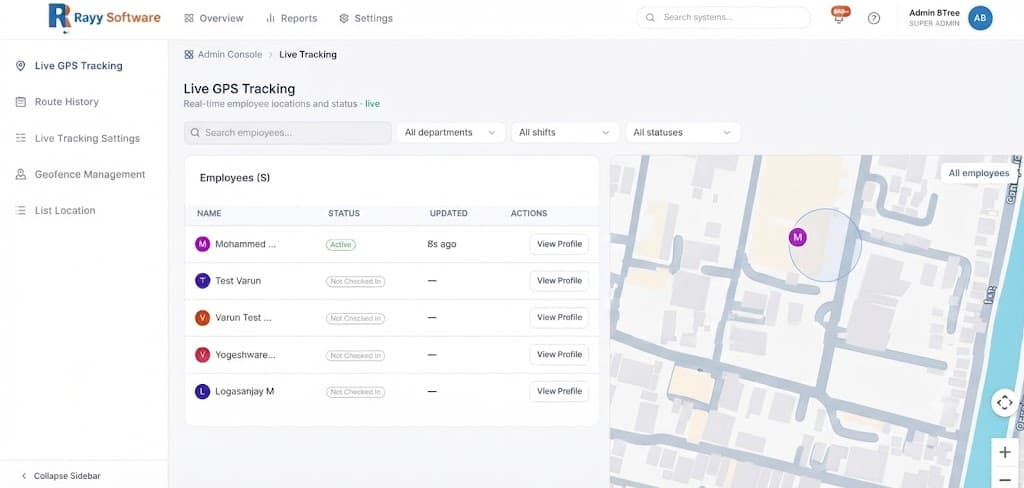
Overview
HRism Live GPS Tracking provides managers and operations leads with real-time visibility into field and hybrid team movements. See active locations on an interactive map without requiring third-party tracking hardware or invasive monitoring.
Watch & Learn
Live GPS Tracker Video Tutorial
Watch how to monitor field team movements, interactive map pins, and real-time location telemetry in HRism.
How It Works
When field employees check in on the mobile app with location enabled, HRism broadcasts periodic coordinates to the admin console interactive map, creating a secure, privacy-focused audit trail of work routes.
Mobile Check In
MobileField employee checks in on mobile device.
Enable GPS
FixApp receives verified GPS coordinate fixes.
Periodic Telemetry
SyncBackground location telemetry syncs periodically.
Admin Console Map
LiveInteractive map updates pin location dynamically.
Shift Complete
StopLocation telemetry terminates upon check-out.
Step-by-Step Instructions
Launch Mobile App
Open the HRism app on your iOS or Android smartphone device.
Enable Location Services
Grant 'While Using App' or 'Always' location permissions when prompted.
Check In with GPS
Tap Check In to initiate shift time recording and location telemetry.
View Active Field Status
Managers open Live GPS map to view current team location pins.
Review Map Pin Location
Click any employee marker pin for speed, timestamp, and site details.
Important Information
Shift Active Only
Background location telemetry is active only during an active checked-in shift. Telemetry stops immediately upon check-out.
Low Power Mode
Ensure Low Power / Battery Saver mode is disabled on field mobile devices for uninterrupted background GPS updates.
Data Saver
HRism optimizes telemetry payload sizes to minimize mobile data usage during field work.